OpenCart wishlist
The list your guests get to keep
OpenCart's own wishlist works for shoppers with an account and does nothing worth having for the majority without one: a guest's saved products live in their session and go when the browser closes. Wishlist takes the wishlist over for everybody, guest or not, through the links your theme already draws. Reports → Most Wishlisted then turns all of it into a reorder list.
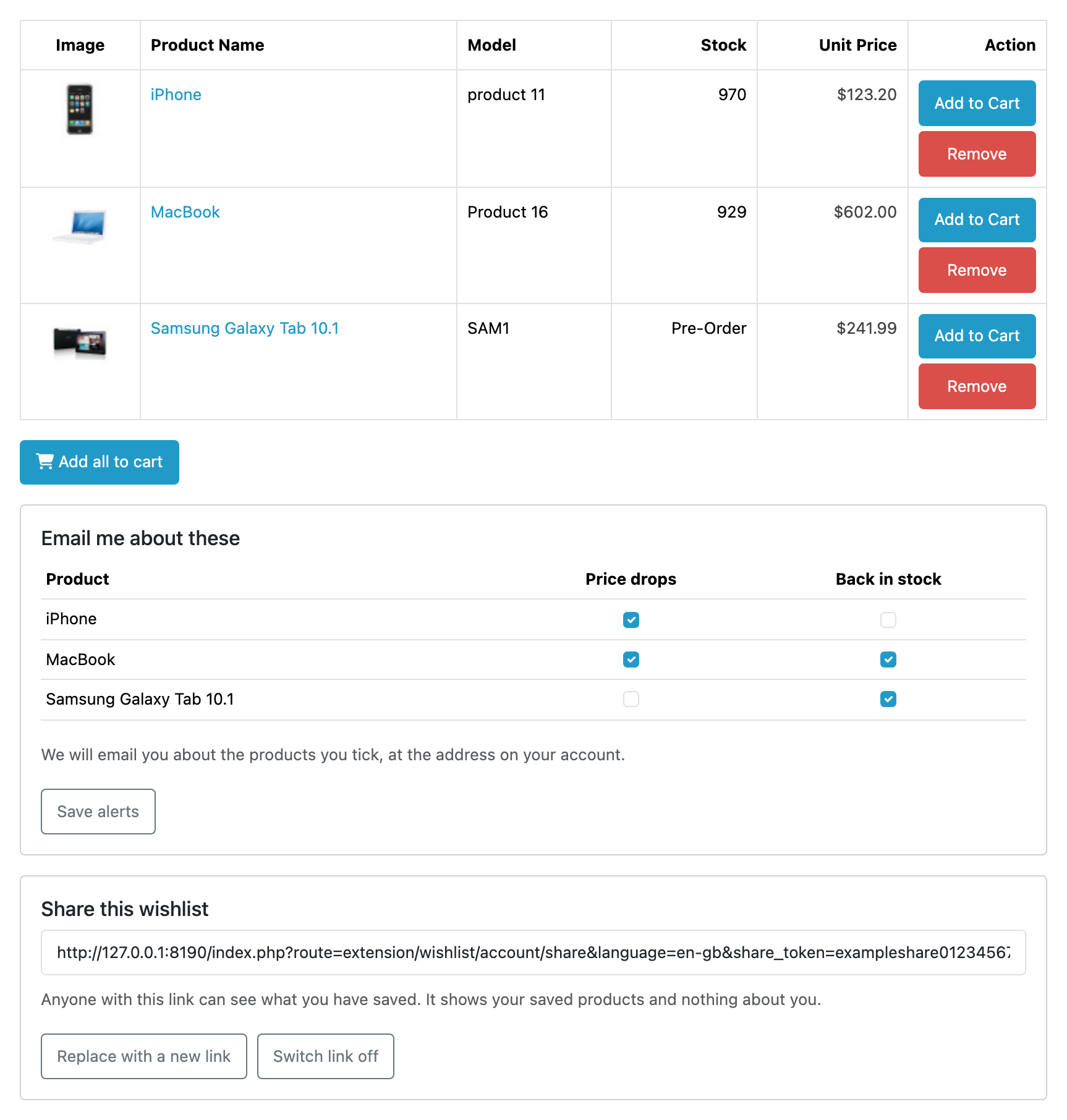
A wishlist a guest can keep
OpenCart saves a signed-out shopper’s products in their session, so closing the browser loses them, and signed-out shoppers are most of your traffic. Wishlist puts them in a first-party cookie that names a row and not a person, so the list survives the session and the browser being shut. Sign in later and the two become one: four things saved as a guest are four things afterwards, never two lists and never a duplicate.
Price-drop and back-in-stock emails, for customers
Saving a product signs a logged-in customer up for both, and the tick-boxes on their own wishlist page are how they narrow it. One email per customer per sweep, in their own language, branded as the store they shop at, and measured against the price they saw when they saved it. Nothing in your admin can subscribe anybody: what they asked to hear about is theirs to set, and the one-click link in the message is the way off.
A share link that says nothing about its owner
One button makes it, and anybody holding it sees the saved products and nothing else: no name, no email, no order history. Replacing it revokes the old link on the spot, and sharing can be switched off for the store altogether. What it is not is an audit trail: a link has no expiry and no password, and nothing records who opened one.
Most Wishlisted, split into customers and guests
One row per product under Reports: the total, who is waiting for stock, who is watching the price, and what it costs and holds now, with five filters and a button through to the product on every row. The split is the point, because guests are never emailed and are counted nowhere else. Every figure counts what is saved right now, so there is no all-time demand total, and what leaves the screen is what you copy off it.
Translation published, not claimed
Which of our strings a named native speaker has actually read is published per extension and per language, and anything unreviewed ships as English rather than as a blank or a raw identifier.
Everything it refuses to do sits on one page. Limits and guarantees says that alerts are for logged-in customers only, that guest wishlists are never browsable
in the admin and never readable through the API (a guest is a count in the report and
nothing else, because nothing identifying is stored about one), that neither the report nor
the API produces a CSV, that a shopper has one list and not several, with no named lists and
no copying between them, that nothing is ever sent by a page view: the alerts go out on an
hourly sweep under OpenCart's own scheduler, with no URL to fetch, no command to run and
deliberately no send them now button, that on OpenCart 4.1.0.4 no alert is sent at
all, because that release ships a cron.php that kills every scheduled task on the
store rather than only ours, that a guest is a browser (cleared cookies or another browser is
a different shopper, and the old list becomes unreachable), and that uninstalling leaves your
data, five tables never dropped, which is what makes an update keep every guest list, share
link and subscription. Worth reading before you buy.
Questions people ask before buying
-
Does OpenCart's own wishlist work for guests?
- Not usefully. A guest's saved products live in their session and go when the browser closes. Wishlist takes the wishlist over for everybody, guest or not, through the links your theme already draws.
-
Can shoppers share a wishlist?
- Yes, through a share link that says nothing about its owner. Customers also get price-drop and back-in-stock emails for what they saved.
-
Does it work with OpenCart 4?
- Every Kyvero extension is built for OpenCart 4.x. Each one declares the lowest release it will install on and refuses to install below it, and its documentation lists the releases a full install-and-upgrade pass was run against.
-
Do I get the source code?
- Yes. An extension is PHP on your own server: readable, not obfuscated, and with no remote licence check to fail. Your copy is yours to modify and to keep backed up.
-
Who answers when something goes wrong?
- A developer, usually the one who wrote the extension. There are two official routes, the support portal and the support address, and both arrive in the same place.
Also for OpenCart
Merchants who run this usually want one of these
Back In Stock
Tells guests when an out-of-stock product or size is available again, with confirmed opt-in and no account needed. It also turns the waiting list into a per-variant demand report.
What it does OpenCart 4.xProduct Search
Finds more of the right products: every word has to match, brands and departments count, synonyms and misspellings are forgiven, and you pin what leads. It also reports what shoppers typed and what came back empty.
What it does