OpenCart profit reporting
OpenCart knows what you sold. It does not know what it cost you
Which is why every report it ships is a revenue report with the word profit nowhere near it. Profitability Copilot adds the one number OpenCart has no column for, what the goods cost, and works the rest out from figures the store already recorded: payment fees, fulfilment, discounts and returns per order line, against the rent, software and advertising that run whether you sell anything or not. Every line is priced at the moment the order becomes real and never repriced afterwards, and nothing is guessed: a product nobody has costed is excluded and counted rather than silently averaged in.
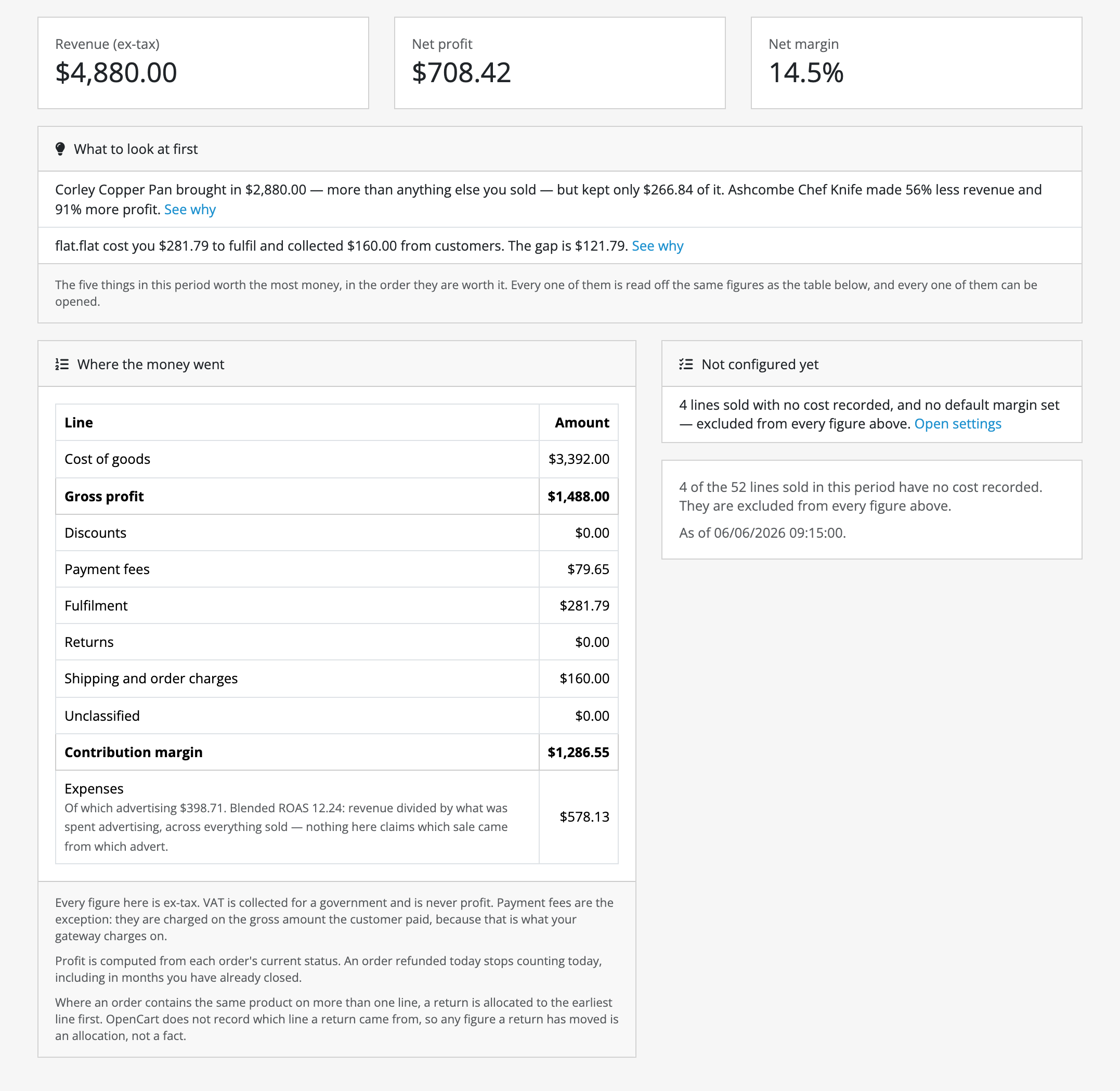
The one number OpenCart has no column for
A cost per product, typed on the product form or loaded from a CSV, behind a permission of its own so not every admin sees your buying prices. Everything else is worked out from figures the store already recorded. It never guesses: a product nobody has costed is left out of the cost and out of the revenue both, counted, and its sales value reported separately, because counting revenue with no cost against it makes an uncosted product look like your best one.
Priced when the order becomes real, never repriced
Every order line is priced when the order reaches a status you nominated, and is never touched again. A supplier putting their prices up next month does not move last month’s figures, and a cost you correct today applies to what you sell from today. Every figure also carries how much it is worth believing: whether the cost was recorded before the order, derived from a default margin, filled in afterwards, or never recorded at all.
What the sale cost you besides the goods
Payment fees and fulfilment costs from rules you write per method (a percentage, a fixed amount, or both), so a card order and a bank transfer stop looking equally profitable. Discounts come off the same line they were given on.
Rent, software and advertising, spread across the days they cover
Recurring operating expenses as one row each, amortised across the period they pay for rather than landing whole on the day the invoice did, with blended ROAS worked out from the rows you marked as advertising. That is the difference between gross margin and the number your bank balance follows.
Returns, read live from OpenCart’s own records
There is no second list to keep. A return filed in the admin, in the storefront or by another extension counts identically, and editing one corrects the figures on the next page load.
A profit and loss you can drill into, or take away
A dashboard profit and loss, a per-product report that drills through to the order and then to the line, and a CSV of either. It never prints a zero for a figure nobody has answered: an unconfigured number reads as a dash and a prompt, on every screen. Nothing it does runs on a page a customer loads, and it edits no core file.
Your reporting tool can do its own arithmetic
Profitability Copilot answers an HTTP API (v1 today), serving the same figures one day at a time, so the tool that holds your numbers aggregates them itself over whatever period it wants rather than scraping a screen. It only ever reads, and it authenticates as an OpenCart API user you create yourself, answers only over HTTPS, and is off until you switch it on. Switching it on is a decision rather than a setting: an OpenCart API credential cannot be scoped, so every holder of one can then read your purchase prices. What will not change about it, and for how long, is written down.
Translation published, not claimed
Which of our strings a named native speaker has actually read is published per extension and per language, and anything unreviewed ships as English rather than as a blank or a raw identifier.
Three refusals are worth knowing before you buy, and limits and guarantees is where they are written down in full. It never guesses a cost, so a catalogue you have not costed reports a smaller store rather than a wrong one. It never prints a zero for a figure nobody has answered: an unconfigured number reads as a dash and a prompt, on every screen and in the API. And it is not an accounting package: it edits no core file, adds nothing to your storefront, and integrates with no bookkeeping system, so it tells you which products and which orders made you money and leaves filing anything to whoever files it now.
Questions people ask before buying
-
Where does the cost of a product come from?
- You type it on the product form or load a catalogue’s worth from a CSV, behind a permission of its own so not every admin sees your buying prices. Nothing is ever guessed: a product nobody has costed is left out of the cost and out of the revenue both, counted, and its sales value reported separately.
-
If my supplier puts their prices up, does last month’s profit change?
- No. Every order line is priced once, when the order reaches a status you nominated, and is never repriced afterwards. A cost you change today applies to what you sell from today.
-
Does it work with OpenCart 4?
- Every Kyvero extension is built for OpenCart 4.x. Each one declares the lowest release it will install on and refuses to install below it, and its documentation lists the releases a full install-and-upgrade pass was run against.
-
Do I get the source code?
- Yes. An extension is PHP on your own server: readable, not obfuscated, and with no remote licence check to fail. Your copy is yours to modify and to keep backed up.
-
Who answers when something goes wrong?
- A developer, usually the one who wrote the extension. There are two official routes, the support portal and the support address, and both arrive in the same place.
Also for OpenCart
Merchants who run this usually want one of these
Import/export
Bulk imports for OpenCart that show you every change before they make it, and can be rolled back afterwards.
What it does OpenCart 4.xReturns Portal
A returns portal a guest can use: they look up their order, pick the lines they are sending back, see an estimated refund worked out from that order’s own rows, and print an RMA slip. You accept or refuse line by line.
What it does