OpenCart bulk import
Know what an import will change, before it changes it
Import/export imports data into an OpenCart store in bulk in two steps that are deliberately kept apart: it writes a plan of every change it would make, and only writes to your catalogue once you have read it. That is the whole product: know first, write second, undo if you were wrong.
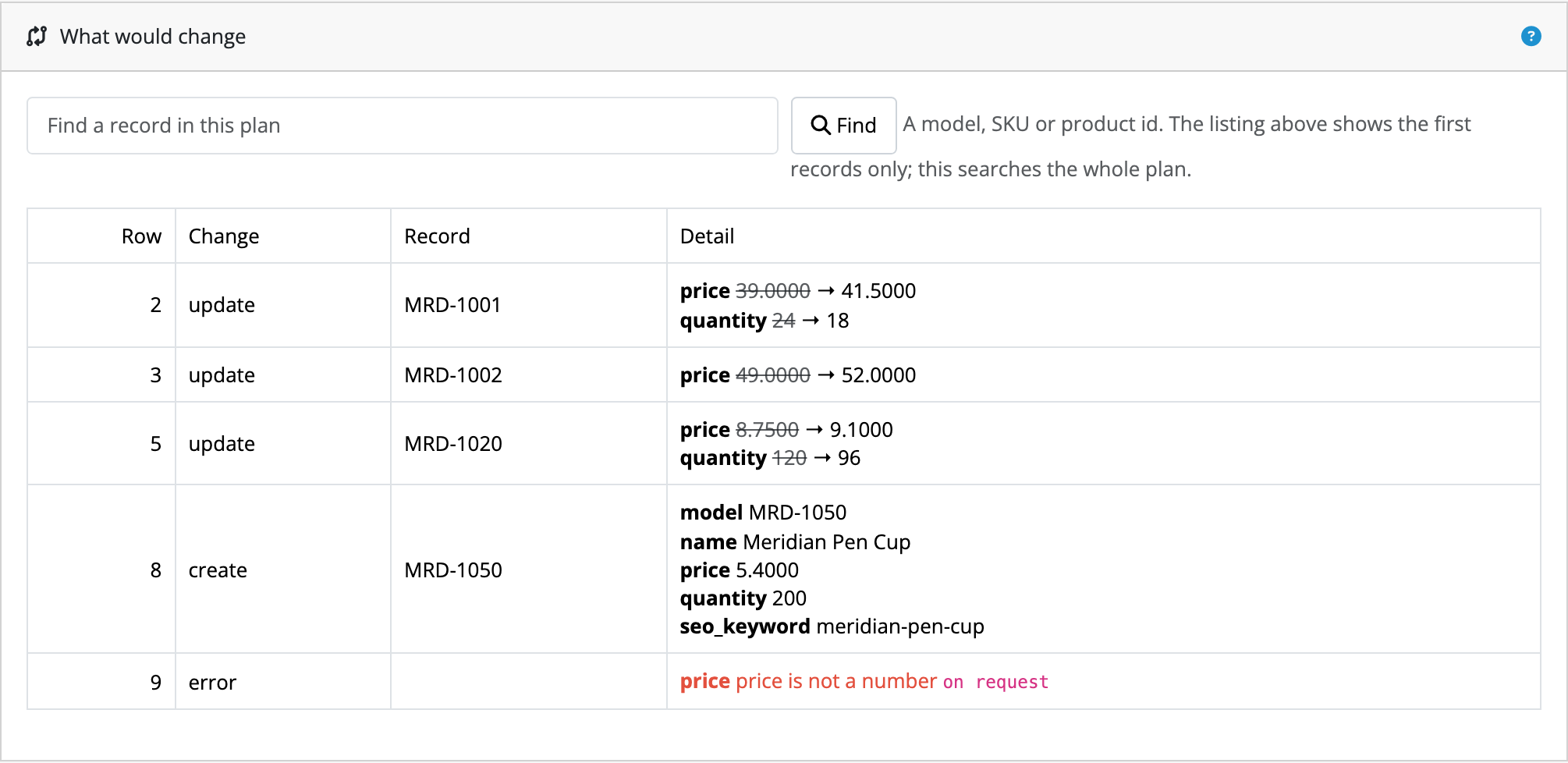
A plan before a write
Import/export reads your file and writes a plan: every record it would create, every field it would alter with the value that field holds right now, and every row it had to reject. Nothing has been written at that point.
An applied import can be rolled back
Applying records the previous value of every field it touches, so the whole job can be undone afterwards, and the rollback is previewed before you confirm it.
A row it cannot read is rejected, not guessed at
A price that reads “on request” is reported in the plan rather than turned into 0.00. Import/export tells you your file is wrong; it does not decide what you meant.
Your store’s columns, not a fixed list
Fields are mapped against the columns your store has, so a column another extension added is mappable with no configuration and no code change.
Translation published, not claimed
Which of our strings a named native speaker has actually read is published per extension and per language, and anything unreviewed ships as English rather than as a blank or a raw identifier.
Where rollback stops is written out rather than glossed over: limits and guarantees states what it restores, what it declines to touch, and why. It is the page worth reading before you point Import/export at a catalogue you care about.
Why a bulk change in OpenCart is worth being careful about
OpenCart 4's product list can copy products and delete them, and that is the whole of its bulk editing. There is no importer in the box either: the maintenance tools are backup, error log, notifications, upgrade and uploads. So a supplier's price file becomes either a day at the product form, or SQL against the database, or an edited backup restored over the top of a live store.
The middle option is the one that bites, because a product is not a row. Its price and
quantity are on the product record, but its name and description are per language in another
table, its identifier codes moved between releases, and its categories, stores and layouts
are join tables where setting a value means deleting rows as well as inserting them. An
UPDATE that moves a price is a one-liner. One that changes a name, a
code or a category is a handful of statements that have to agree with each other, and
nothing tells you when they did not.
None of this is hard. What makes it expensive is that none of it is visible until afterwards. The four routes, and what each one costs you goes through them in full.
What Import/export changes about that
It splits the job in two. The first half reads your file and produces a plan: every record it would create, every field it would alter with the value that field holds right now beside the one that would replace it, and every row it could not accept with the reason. At that point nothing has been written, and the plan is a thing you can read, share, and decide against.
The second half applies it, through OpenCart's own model rather than around it, and keeps enough to roll the whole import back afterwards. Both halves are ordinary admin screens; neither requires database access, and neither asks you to trust a row count.
Questions people ask before buying
-
Can I see what a bulk import will change before it runs?
- That is the whole product. Import/export writes a plan of every change it would make, showing each value it would replace beside the one there now. It writes nothing to your catalogue until you have read that plan and applied it.
-
What happens if I apply an import and it turns out to be wrong?
- An applied import can be rolled back afterwards, so the import you regret is one you undo rather than one you restore a database backup for.
-
Does it work with OpenCart 4?
- Every Kyvero extension is built for OpenCart 4.x. Each one declares the lowest release it will install on and refuses to install below it, and its documentation lists the releases a full install-and-upgrade pass was run against.
-
Do I get the source code?
- Yes. An extension is PHP on your own server: readable, not obfuscated, and with no remote licence check to fail. Your copy is yours to modify and to keep backed up.
-
Who answers when something goes wrong?
- A developer, usually the one who wrote the extension. There are two official routes, the support portal and the support address, and both arrive in the same place.
Also for OpenCart
Merchants who run this usually want one of these
Product Feed
Google, Meta and Microsoft Advertising feeds generated from your catalogue on a schedule. Each channel’s own fields are set against your own values, and what every field will produce is shown against your own products before you save.
What it does OpenCart 4.xProduct Configurator
Conditional options on top of OpenCart’s own product options: rules that show, hide or require an option (or a single value of it) as a customer configures a product, instantly on the page and enforced again on the server.
What it does