OpenCart delivery date
Let them choose the day, from the days you can keep
OpenCart asks a customer where an order goes and never when. Delivery Date puts a day-and-window picker in the shipping-method block your theme already renders, offering only the days your calendar, your cut-off and your capacity allow. Then it gives you the day back as a sheet you can print. It is for a store that delivers with its own van, or takes pickup slots, or makes things to order: any store where when is a promise rather than a courier's estimate.
Only the days you can do
Your delivery week, your closed dates, your cut-off, your preparation time and how far ahead you take orders. The picker offers what comes out of those and nothing else, and the screen you set them on works the next fortnight out beside the form, including the numbers you have typed and not yet saved.
A cap that turns a window off
Each window takes a number of orders: a cap on the window, on one weekday’s window, or on the whole weekday, all checked together. A full window is struck through rather than hidden, and a day whose windows are all full drops out of the list. A busy Saturday stops selling itself.
The day’s work on one sheet
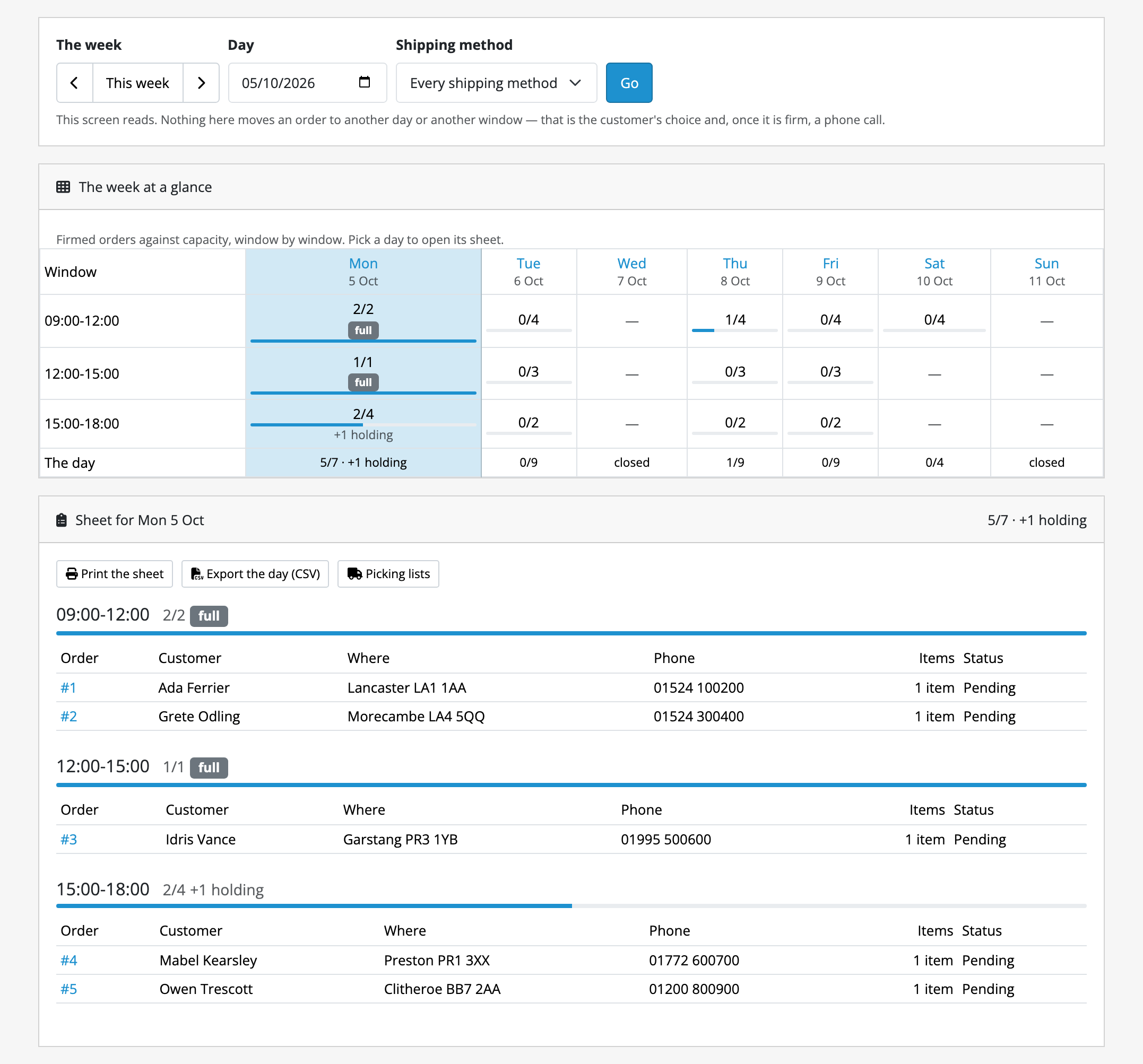
Sales → Delivery Days puts the week’s occupancy above the chosen day’s orders, grouped by window. It prints for the warehouse with the full street address and a tick column the screen does not show, and exports the day as CSV. It is read-only: moving a firm booking is a phone call, and the absence of that control is deliberate.
Never earlier than the day they chose
If the day cannot be kept the order moves to the next day that can be, never the nearest, and the customer is told: at checkout, in the confirmation email, on their order page and in the order history. Where there is nothing left to offer, the order is marked as having no delivery day rather than given one nobody promised.
Translation published, not claimed
Which of our strings a named native speaker has actually read is published per extension and per language, and anything unreviewed ships as English rather than as a blank or a raw identifier.
The limits are not in the small print. Limits and guarantees says that a slot cannot cost money, that nothing is narrowed by postcode or customer group, that it talks to no carrier, and that a cap counts orders, not vans. Read it before you buy.
Questions people ask before buying
-
Can customers choose a delivery date at checkout in OpenCart?
- Not in stock OpenCart. Delivery Date puts a day-and-window picker in the shipping-method block your theme already renders, and offers only the days your calendar, your cut-off and your capacity allow.
-
Can I stop too many orders landing on the same day?
- Yes. Each window takes a set number of orders and stops being offered once it is full, so the capacity is enforced when the customer picks rather than discovered when you load the van.
-
Does it work with OpenCart 4?
- Every Kyvero extension is built for OpenCart 4.x. Each one declares the lowest release it will install on and refuses to install below it, and its documentation lists the releases a full install-and-upgrade pass was run against.
-
Do I get the source code?
- Yes. An extension is PHP on your own server: readable, not obfuscated, and with no remote licence check to fail. Your copy is yours to modify and to keep backed up.
-
Who answers when something goes wrong?
- A developer, usually the one who wrote the extension. There are two official routes, the support portal and the support address, and both arrive in the same place.
Also for OpenCart
Merchants who run this usually want one of these
Pre-Order
Sells what has not arrived yet (a product or a single option value, with an expected date) and either charges in full at checkout or emails a payment link once the stock lands.
What it does OpenCart 4.xReturns Portal
A returns portal a guest can use: they look up their order, pick the lines they are sending back, see an estimated refund worked out from that order’s own rows, and print an RMA slip. You accept or refuse line by line.
What it does